How to Build a SaaS with AI: The Infrastructure Behind the App
build-saas-with-ai-infrastructure
Read
Describe the app in a sentence. Connect the Claude, Codex, opencode or Antigravity plan you already have, choose how much it may do on its own, and it writes the code, sets up the database, points the domain and ships it — then keeps it running, with the same files open in your browser.
This shows the shape of the shortlist your council would bring back. It is paused for now, so please check back soon.
It can already write the whole app from a prompt. Running it is the other half: the server, the database, the domain, the mail, the deploy. Wiring your AI into those is normally an afternoon of keys, tokens and cloud consoles. Here it is an authorization.
No SSH setup, no cloud-console hopping, no DevOps to learn first. Same hardware, same root, same Linux underneath — what changes is how much you have to know before your AI can touch any of it.
Runtimes, databases, self-hosted tools, voice and game servers. Ask for one by name and it lands on the machine you already pay for.
A file manager with a real editor, and a terminal, in the browser. Every machine we rent has both, from the three-dollar one upwards.
Nobody has to be awake at 3am. Agents watch what is running, restart what falls over, and leave the log open for you.
Features an app tends to need, like invoicing or taking bookings. Name one in the prompt and the council wires it into the build.
A file tree, a real editor and a terminal, pointed at the machine that is serving your app. Beside them, the AI you connected, working on the same files. No local checkout, no key to lose, nothing to install.
How a build actually runsThe tree is the container's own filesystem. Save and it is live. There is no deploy step between the editor and the machine.
It reads the same files you have open. You can hand it the thing you are stuck on without describing it first.
Every line it writes is a line you can edit by hand, mid-build. It carries on from where you stopped.
Read-only lets it inspect the app and tell you what it would do. Auto-approve lets it get on with it. Between the two is this board, so the decision is made with switches rather than a paragraph of reassurance. Turn one off and the council has to come back and ask. Changes apply to the next thing you say to it, not to some future session.
It wants to
Right now it writes the code and hands it back to you to deploy. Give it a prompt and a machine, and watch the first build go live in front of you.
On an app plan, before a line is written, your council puts names on the table, argues for the ones worth keeping, and lets you settle it. You never start at a blank page.
Learn morePoint a domain at the machine and then stop thinking about it. The records, nameservers and certificates get set and kept in order for you, on any plan, so you never have to find out what any of them mean.
Learn moreA whole server, not a slice of one: mail on your domain, your services, anything from the catalogue below. Plus the editor and the terminal above, so you are never locked out of your own box.
Learn moreThere are two ways to get any of it. Rent a machine for the one thing you came for — a WordPress site, a mail domain, a database, a game server — and pay for that group and nothing else. Or describe an app on an app plan, and whatever it needs from this list runs on the machine that comes with it at no extra charge.
Browse all 90Most of these you choose at checkout: every plan asks what to put on the machine before it builds one. The rest you ask for afterwards, the way you would ask a colleague: “put a Gitea and a Redis on this box”. Your council installs it, wires it up, and sends you back the address.
A first week on an app plan, day by day.
You write the prompt. The idea behind it gets scored six ways, honestly, and that includes being told when the answer is no.
You settle on a name and get the domain pointed at the machine that will run the app.
A real server exists, with your domain on it and mail arriving.
The AI you connected builds the app on the machine while you watch in the browser editor. You can change anything it writes, mid-build.
You stop driving. The council takes over the deployments, the DNS and the inbox, and reports back from one panel.
That is the long way round, and it is one continuous journey rather than six products. Already running an app? You join at Build — bring the domain and the codebase, connect your AI and carry on from there.
Full breakdownDescribe the application in your own words, or bring one you already run — a domain, a codebase, an app that already has users.
Your council pressure-tests the idea behind the prompt across six angles, tells you where it is weak, and the verdict stays on file afterwards.
Settle on a name worth keeping, check the domain, and claim the identity the app will ship under.
Connect Claude, Codex, opencode or Antigravity. It builds the frontend, the database, the accounts and the checkout on your own machine while you watch in the browser editor.
Deploy it, point the domain, issue the certificate, start the mail. From here there is something on the internet with your name on it.
The council stays: mail, updates, restarts, deployments, the 3am work. You decide what it may do without asking first.
Each of these is named after the job, not after a product. Rent a machine and you pick from this list yourself, at checkout or afterwards in a sentence. Take an app plan and the council picks for you, from exactly the same list, based on what the prompt asks for.
Not to us. To six different companies, on six different renewal dates, with six dashboards to log into when something goes wrong at the weekend.
One machine, one bill, one login. The database, the mailboxes, the backups and the monitoring are on it already, and so is the crew that runs them.
$ over a year, and five fewer things to remember to cancel.
The left-hand figures are typical list prices for each piece, kept deliberately on the low side. They are an illustration of a common stack, not a quote and not any particular company's pricing. The figure on the right is what this store charges for the entry app plan, which is the one that replaces the whole stack at once. Renting a machine for a single piece of it costs less again.
Almost everything here is one machine doing one job, and it is priced like that: a site, a mail domain, a database, a runtime, a game server. Pick the kind, pick the size, say what goes on it at checkout.
Sites and shops, from a plain HTML page to WordPress and a full storefront, on a machine that is yours.
Starter
One site, comfortably. Enough for a brochure, a blog or a shop finding its feet.
1 GB memory · 1 vCPU · 10 GB storage
Up to $32.50/mo at the largest size.
Real mailboxes on your own domain, webmail to read them in, and the sending your app needs.
Inbox
Email on your own domain for you and a couple of others, with the records set up for you.
3 mailboxes · 5 GB each · Webmail, IMAP and SMTP
Up to $30.50/mo at the largest size.
Whatever your code is written in, it has somewhere to run. The language, its package manager and something to restart it are already set up.
Script
A bot, a scraper, a cron job. Something small that has to keep running.
1 GB memory · 1 vCPU · 10 GB storage
Up to $30.50/mo at the largest size.
Somewhere to keep the records, on your own machine, with passwords you hold and can change at any time.
Cache
A Redis or a small Postgres sitting next to an app that needs one.
1 GB memory · 1 vCPU · 10 GB storage
Up to $67.00/mo at the largest size.
The tools you would otherwise rent by the seat: code hosting, search, dashboards, status pages. Yours, on your machine.
Tool
One tool for one person or a small group. An uptime monitor, a paste bin, a wiki.
1 GB memory · 1 vCPU · 10 GB storage
Up to $37.50/mo at the largest size.
Somewhere for you and your friends to play, with the mods you want and nobody wiping it at the end of the month.
A few friends on a vanilla world. Cheap enough to leave running.
2 GB memory · 1 vCPU · 10 GB storage
Up to $67.00/mo at the largest size.
Voice chat for a community, a guild or a team, and the panels for running it.
Room
A channel or two for a group that just wants to talk while they play.
1 GB memory · 1 vCPU · 5 GB storage
Up to $20.50/mo at the largest size.
The same machines as above, with a council on top that names the thing, argues the idea out, builds it, and then stays to run the mail, the DNS, the deployments and the 3am work. Everything in the catalogue runs on that machine at no extra charge. Paying more buys more of the council's time, more room, and more seats.
Every price above is a machine of your own, not a slice of one, and every one of them comes with the file manager, the terminal and your own AI docked beside them. Mail is the exception: that is mailboxes on our mail server rather than a box to log into. Monthly, no contract, and you can move up a size or leave whenever you like.
We supply the environment, the tools, the permissions and the app's context. The intelligence is whichever of these you pick, on your own account at their price — so you keep using whichever improves fastest.
More about BrainsSign in with the Claude account you already have. The sharpest of the four at long, multi-step work on a real codebase.
Bring the Codex subscription you already have and let it drive the builds and the ongoing engineering.
Link Google's coding-agent workflow and run builds and hands-off operations on your own quota.
Free models, and the only one of the four that needs no account at all. Slower than the paid Brains, but there is nothing to sign up for.
You describe an application in a prompt, and your own AI builds it and keeps it running. You connect the Claude, Codex, opencode or Antigravity plan you already pay for, choose what it may do, and it works on the real code, server, database, domain and deployments behind a live app — with the same files open in your browser.
That is the point of it. Four Brains are supported today — Claude, Codex, opencode and Antigravity — and you sign in to your own account, on your own plan, at their price. We would rather not be a reseller standing between you and your own quota, and we would rather you kept moving to whichever model improves fastest.
Read and change the code, run commands, provision and query the database, work with your GitHub repository, deploy and roll back, read the logs when something breaks, set DNS and certificates, run the mailboxes. All of it inside your own environment and all of it bounded by the permissions you set.
No. There are no keys to generate, no MCP server to install, no cloud credentials to copy between dashboards and no terminal you are obliged to open. Authorizing your AI here is closer to authorizing an app. The terminal is there if you want it, not because you need it.
Two modes and a board of switches. Read-only lets it inspect the app and recommend; auto-approve lets it edit files and run commands without asking every time. The rows marked enforced are applied outside the model — it is not asked to behave, it is not given the tool. You can change the level of access at any time, cap what one instruction may spend, and read back what was changed and what was run.
Either. Write a prompt and the council pressure-tests the idea, names it, finds the domain and builds it. Or bring the domain and the codebase of an app you already run, connect a Brain and carry on from here.
It keeps running, and so does the AI. Signups, users, checkout, mailboxes, domains, deployments, logs and monitoring live in the same environment as the code, and they are all still there after launch — which is when most of the work actually starts.
Yes, and many people do. Web hosting, mail on your own domain, a database, a runtime, a self-hosted tool, a game or voice server: each is its own group in the shop, priced on its own, and you pick what goes on the machine at checkout. The app plans are the other product — the same machines plus a council that builds and runs an app on them — and you do not need one to get the other.
Yes. Connect a GitHub repository and the container pushes and pulls like any other checkout, so you can work locally while your AI works on the machine against the same history. The browser editor is there for when you do not want to clone anything, not as the only way in.
Your app runs in its own container, not alongside anyone else's. Secrets are encrypted, scoped to what needs them, and revocable. They are never written to logs, and every action taken in your environment is recorded where you can read it back.
You take the domain, the code and the data with you. They were yours throughout, and there is no stage at which we hold them hostage.
A ticket reaches us from any plan in the shop. On the app plans it is written down: Starter is community support, Operator adds email, Studio puts you ahead of the queue. The council is also reading the machine's own logs the whole time, which is usually what answers the question first.
Something else? Contact the team
No region to pick, no instance size to guess at, no support ticket to open before anything can start.
The timings describe a normal run rather than a guarantee. A big import or a slow upstream registrar will take longer, and the panel tells you which step it is on rather than showing you a spinner.
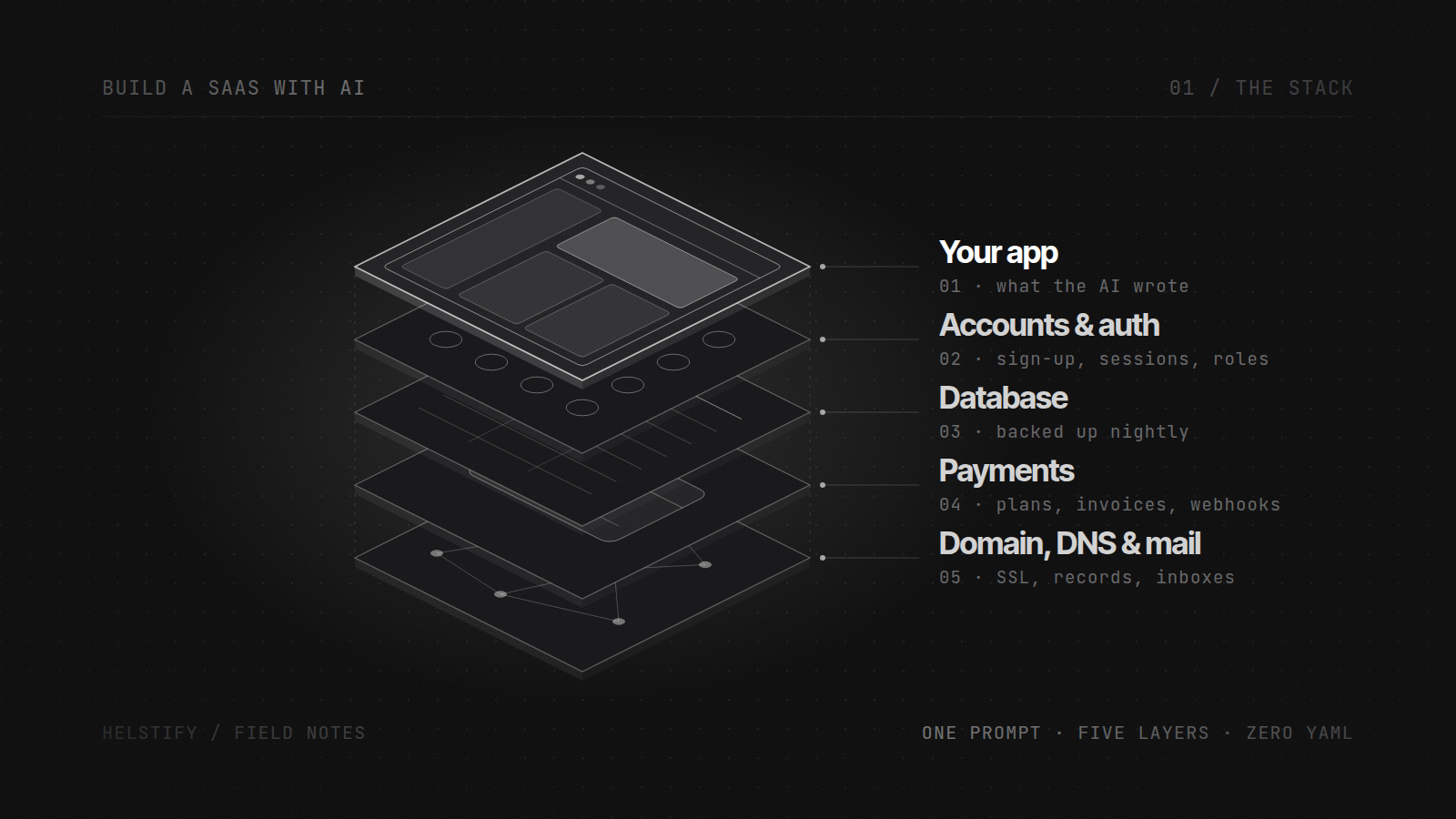
build-saas-with-ai-infrastructure
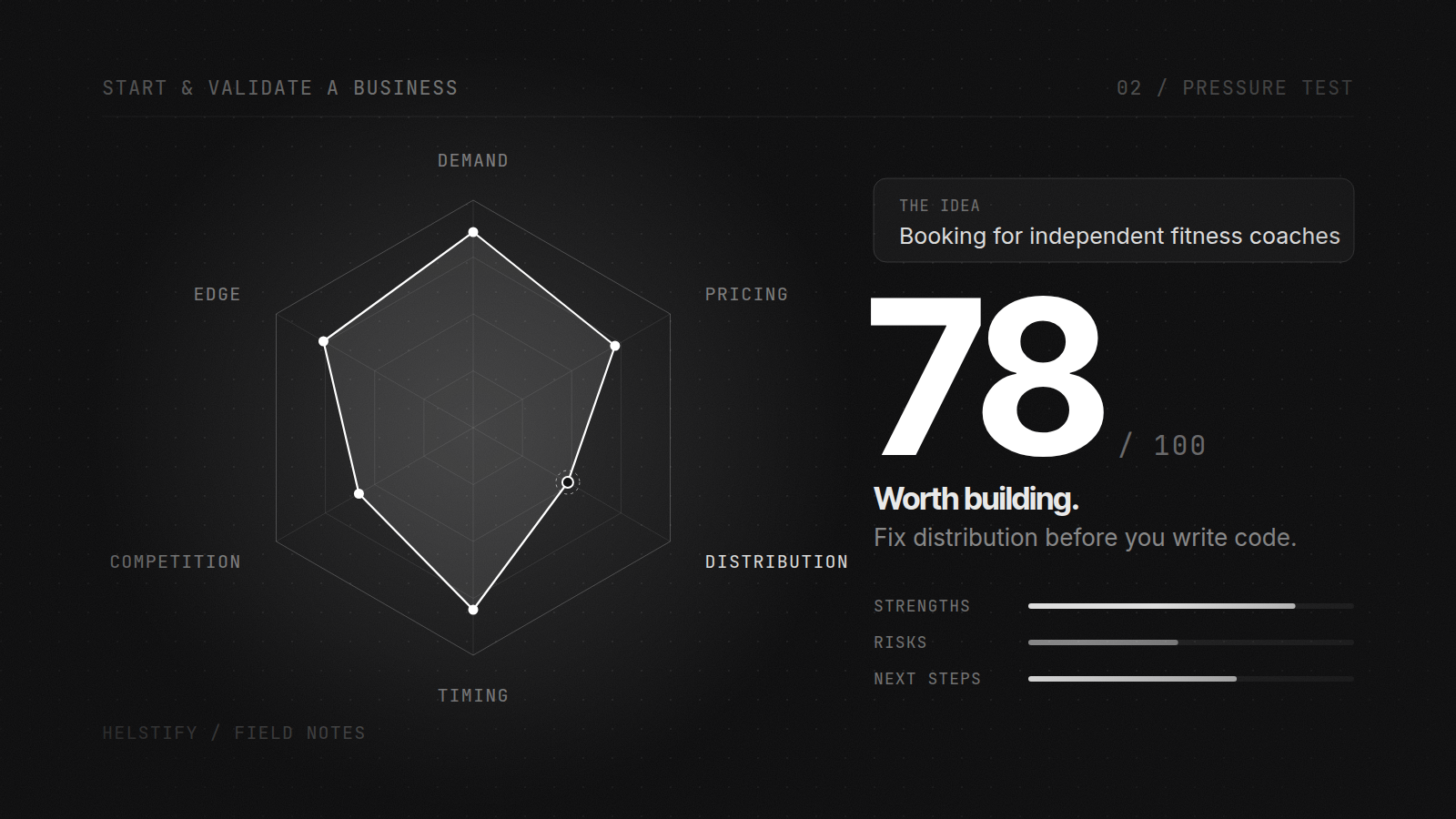
Learn how to use AI to pressure-test a business idea, identify strengths and risks, sharpen positioning, explore names and decide what to do next.
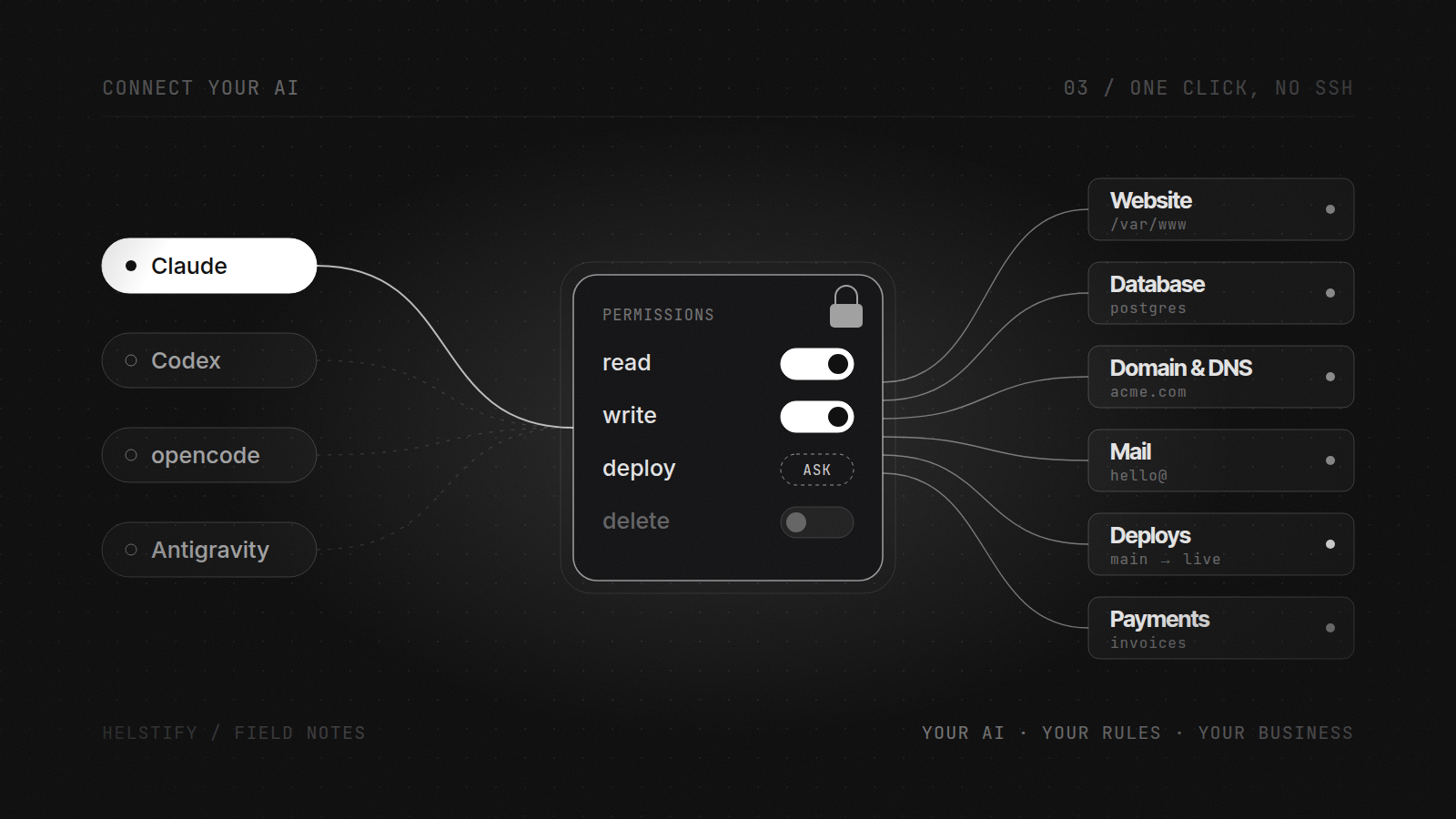
Connect Claude, Codex and other supported AI tools to the environment where your business actually runs, without manually setting up SSH, MCP or cloud infrastructure.
A box for one job from $3.00 a month, or a whole application built from a prompt and run for you. Start from a prompt or bring an app you already run. Either way you connect the AI you already pay for, and the first hour costs nothing.