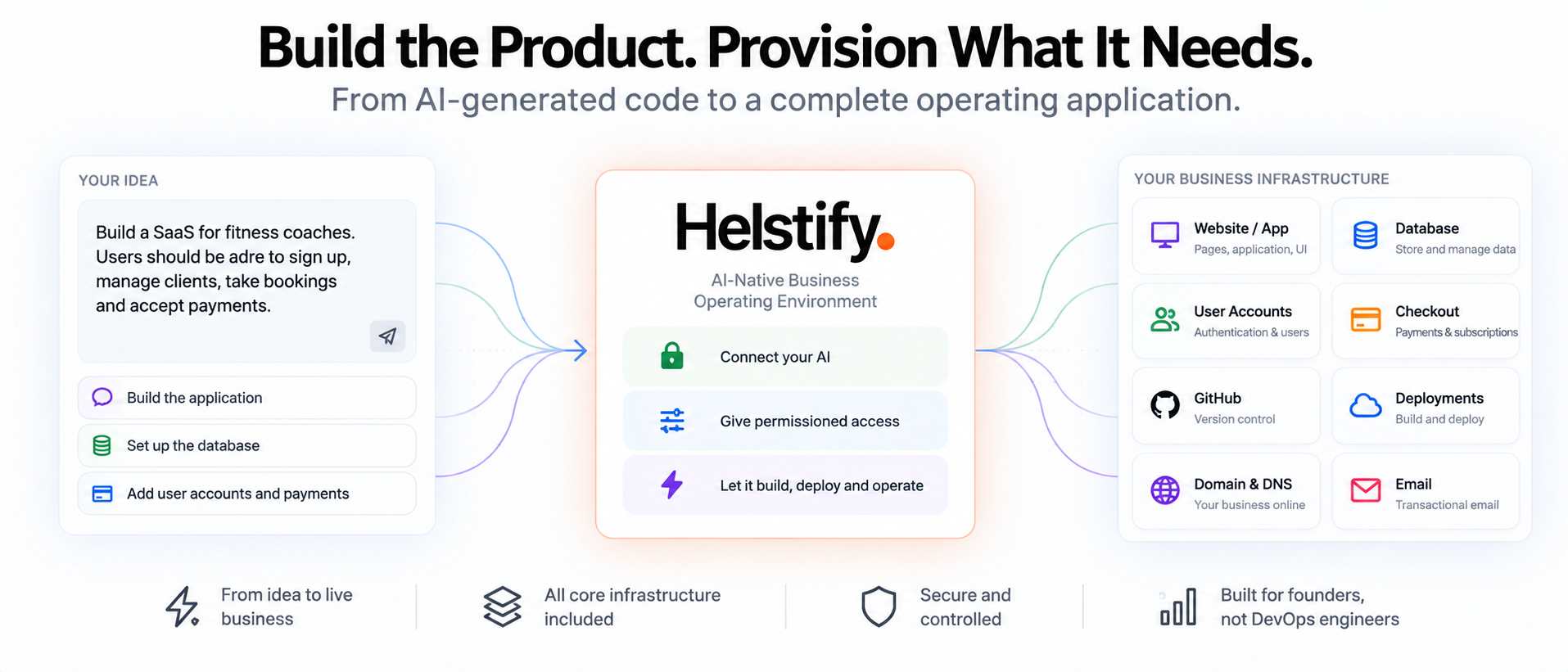
AI can generate a website or application remarkably quickly.
But the interface is only the visible part of a real software business.
A SaaS product also needs somewhere to store data, a way for users to sign in, payments, version control, deployments, domains, environment configuration and infrastructure that keeps everything running.
That creates an important distinction:
Building the app is not the same as building the system behind the app.
For an AI-built product to become a real operating business, those layers need to work together.
This guide explains what sits behind an AI-built SaaS, what each part does, and how AI can increasingly help create and manage the complete environment.
Quick answer
A production SaaS application typically needs more than generated pages and code.
The core stack can include:
- website or application
- source code
- database
- user authentication
- user accounts
- payments or checkout
- version control
- environment variables and secrets
- hosting
- deployment workflow
- domain and DNS
- monitoring and logs
- backup and recovery
AI can help create many of these components.
The bigger challenge is connecting them into one working environment.
That is where an AI-native business operating environment becomes useful.
What does an AI-built business actually need behind the application?
The exact infrastructure depends on what the product does.
A simple content website may need very little.
A SaaS application with customers, subscriptions and stored data needs considerably more.
A typical software business can be viewed as several connected layers.
| Layer | What it does |
|---|---|
| Website / application | What customers interact with |
| Code | Defines how the product behaves |
| Database | Stores application and customer data |
| Authentication | Identifies who is using the product |
| User accounts | Stores user-specific access and information |
| Payments | Collects money from customers |
| Version control | Tracks code and changes |
| Hosting | Runs the application |
| Deployments | Moves changes into production |
| Domain & DNS | Gives the business its public address |
| Handles communication and transactional messages | |
| Secrets | Protects credentials and sensitive configuration |
| Analytics | Shows what users and the business are doing |
| Monitoring | Identifies failures and operational issues |
An AI-generated interface becomes a business application only when the required layers behind it work reliably together.
How do you build a SaaS with AI?
A useful AI SaaS workflow starts with the business requirement rather than the code.
For example:
"Build a booking platform for independent fitness coaches. Coaches should create accounts, manage customers, accept bookings and take payments."
AI can help convert that requirement into application functionality.
But a complete SaaS may still need:
- frontend pages
- application logic
- database tables
- authentication
- customer accounts
- permissions
- payment processing
- repository management
- deployment
- production configuration
AI can help with all of those tasks when it has the appropriate tools and access.
The workflow increasingly becomes:
Describe the outcome → AI builds the components → infrastructure is provisioned → application goes live → AI continues operating it.
The important change is that AI does not need to stop after generating the code.
Is an AI website builder the same as an AI app builder?
No.
They overlap, but they usually solve different levels of complexity.
| AI website builder | AI app builder |
|---|---|
| Primarily creates pages | Creates interactive applications |
| Content and presentation focused | Logic and workflow focused |
| May use forms | Usually includes application state |
| Limited user-specific functionality | Often requires user accounts |
| Database may not be required | Database is commonly required |
| Simple public experience | Can support private user experiences |
| Often marketing focused | Often product or SaaS focused |
A business website might display services, pricing and contact information.
A SaaS application may need to know:
- who the user is
- what data belongs to that user
- what plan the user purchased
- what actions the user can perform
- what information should be stored
- what happens when the user returns
That requires more infrastructure behind the interface.
Does every AI-built application need a database?
No.
A simple static website may not need one.
But applications that store information usually do.
Examples include:
- user profiles
- bookings
- customer records
- orders
- subscriptions
- saved preferences
- messages
- uploaded files
- application settings
- transaction records
The database gives the application memory.
Without a database, many applications would forget what happened after a user closed the session.
How does an AI app get a database?
Traditionally, a developer chooses a database, provisions it, creates credentials, defines the schema and connects the application.
AI can now assist with much of that work.
For example, the founder may describe:
"Users should be able to create projects. Each project can contain multiple tasks."
The AI can help translate that business requirement into data structures such as:
- users
- projects
- tasks
- relationships between them
When the AI is connected to an environment with database tooling, it can potentially go beyond generating the schema.
It can also help create and connect the database.
The important distinction is:
Generating database code is different from provisioning and operating an actual database.
A real application needs both.
What database should an AI-generated SaaS use?
There is no single database that is best for every AI-built application.
The choice depends on the application's data and operating requirements.
For many SaaS applications, a relational database is a practical starting point because the product contains structured relationships.
For example:
A customer has projects.
A project has tasks.
A task belongs to a user.
A subscription belongs to an account.
These relationships fit naturally into relational structures.
Other applications may have different requirements.
The important questions are:
- What information needs to be stored?
- How is that information related?
- How frequently is it read or changed?
- How much data is expected?
- Does the application need real-time behaviour?
- How important are consistency and transactions?
- How will backups and recovery work?
The database should follow the product requirements rather than whichever technology the AI happens to suggest first.
Can AI create a database automatically?
Yes, when the AI has access to database provisioning and management tools.
For example, a founder might ask:
"Create the database required for the new customer portal."
A connected AI could potentially:
- inspect the application
- determine required data structures
- create database tables
- configure application access
- update application code
- test the connection
The ability to execute those steps depends on the environment and permissions available to the AI.
Without execution access, the AI may only generate instructions or code.
With the appropriate operating environment, it can move closer to completing the work itself.
Can AI migrate a database?
Yes, with the right tools and controls.
A database migration changes the structure or contents of an existing database.
Examples include:
- adding a new field
- creating a new table
- modifying relationships
- changing indexes
- moving data into a new structure
For example:
"We now need every customer account to support multiple team members."
That product change may require changes to both the application and the database.
AI can help design and execute the migration when it has the necessary access.
Database changes can affect production data, so permissions, backups and recovery become particularly important.
Why are user accounts important in SaaS?
Most SaaS applications need to know who is using the product.
Authentication answers:
Who is this user?
Authorisation answers:
What is this user allowed to do?
These are related but different.
For example, an application might have:
- account owners
- administrators
- team members
- viewers
They may all be able to sign in.
But they should not necessarily have the same permissions.
That is why user management becomes part of the application architecture rather than simply another page.
How do you add user login to an AI-built application?
A complete login system can involve:
- signup
- sign-in
- password management
- session management
- account recovery
- user records
- permissions
- protected pages
The AI needs to connect those elements to the application and its data.
A founder may simply describe:
"Users should create an account before they can access their dashboard."
AI can help implement that requirement.
But authentication is security-sensitive.
The important objective is not merely making the login screen work.
The product also needs to ensure users can only access the data and functionality they are authorised to use.
How should an AI-built app handle different user roles?
User roles should reflect how the real business operates.
For example, a SaaS application might include:
| Role | Typical access |
|---|---|
| Owner | Full account control |
| Admin | Manage users and settings |
| Member | Use product functionality |
| Viewer | Read-only access |
The exact structure depends on the product.
The mistake is to add complex permissions before the business requires them.
Start with the simplest access model that safely supports the product.
Expand permissions as real use cases appear.
How do you add payments to an AI-built SaaS?
A SaaS product usually needs more than a payment button.
The system may need to understand:
- which plan the customer purchased
- whether payment succeeded
- whether a subscription is active
- when renewal happens
- whether access should change
- what happens when payment fails
- whether the customer upgraded or downgraded
This means checkout needs to connect with application logic and user accounts.
A typical flow might be:
Choose plan → Checkout → Payment confirmed → Account updated → Paid features enabled
AI can help build that workflow when checkout and application systems are available in the environment.
What is the difference between checkout and subscription logic?
Checkout is where the payment happens.
Subscription logic determines what the product does after payment.
For example:
A user purchases the Pro plan.
The payment system confirms the transaction.
The application must then know that this user's account is now Pro.
That may change:
- feature limits
- storage
- number of users
- access to tools
- usage allowances
The product therefore needs a connection between payment state and application state.
A payment page alone does not create a SaaS billing system.
Why does an AI-built app need version control?
AI can modify code very quickly.
That makes version control more important, not less.
Version control provides a record of how the application changed.
It helps answer:
- What changed?
- Who or what changed it?
- When did the change happen?
- What version is currently live?
- Which change caused the problem?
- Can we return to an earlier version?
Without version control, rapid AI-generated changes can become difficult to manage.
A repository such as GitHub can become the history of the product.
Can AI work directly with GitHub?
Yes, when the repository and appropriate tools are connected.
A connected AI can potentially help with tasks such as:
- inspect repository files
- modify code
- review changes
- compare versions
- create commits
- understand previous work
- prepare changes for deployment
For example:
"Check what changed in the signup flow since the last working version."
Version control gives the AI the historical context required to investigate that question.
This is especially useful as the number of AI-generated changes increases.
What should a GitHub workflow for an AI-generated app look like?
It does not need to be overly complicated.
A simple workflow can be:
Code → Review change → Commit → Deploy → Verify
The exact level of process depends on the size and risk of the application.
For a solo founder, the workflow may be lightweight.
For a larger production application, it may require:
- branches
- reviews
- automated tests
- staging
- production approval
The important principle is that AI-generated code should still have a traceable history.
AI changes the speed of software development.
It does not remove the need to understand what changed.
What are environment variables?
Applications often need configuration that should not be hard-coded directly into the source code.
Examples include:
- database connection details
- service URLs
- API configuration
- email configuration
- application settings
Environment variables allow those values to be supplied separately from the code.
This is useful because different environments may require different settings.
For example:
A test environment may use one database.
Production may use another.
The application code can remain the same while the environment configuration changes.
What are secrets?
Some application configuration is sensitive.
Examples may include:
- API keys
- database credentials
- private tokens
- service credentials
Those values should not normally be exposed inside public source code.
Secrets management provides a safer place for sensitive configuration.
This is particularly important when AI can work across the application environment.
The AI may need to use a credential to complete an approved task without unnecessarily exposing that credential to users, logs or public repositories.
The goal is:
Give the application and AI the access required to work without turning sensitive credentials into ordinary code.
Can AI create infrastructure automatically?
Yes, when the operating environment exposes infrastructure capabilities to the AI.
For example, instead of telling the founder:
"Go to your cloud provider, create a database, copy the credentials, configure the environment variables and restart the application."
the user could increasingly ask:
"Create and connect the database this feature needs."
The AI can then perform the technical steps available to it.
This is a major shift.
Traditional development asks the user to understand the implementation.
Agentic infrastructure allows the user to increasingly describe the desired outcome.
What infrastructure does a SaaS actually need?
Not every SaaS needs the same architecture.
But a useful baseline is:
| Capability | Why it exists |
|---|---|
| Application | Delivers the product |
| Database | Stores information |
| Authentication | Identifies users |
| User management | Controls account access |
| Payments | Monetises the product |
| Version control | Tracks changes |
| Hosting | Runs the application |
| Deployment | Publishes new versions |
| Domain | Gives users a stable address |
| Communicates with users | |
| Secrets | Protects sensitive configuration |
| Analytics | Measures usage |
| Monitoring | Detects problems |
| Backup | Protects important data |
The right infrastructure is not the one with the most tools.
It is the smallest reliable environment that supports what customers need.
Should a founder choose every infrastructure tool individually?
Traditionally, that has been common.
A founder might separately choose:
- application hosting
- database provider
- authentication provider
- payment provider
- email provider
- analytics provider
- version control
- monitoring
- domain provider
Each service can be excellent individually.
But the founder then becomes responsible for understanding how all the pieces fit together.
AI changes the opportunity.
Instead of manually assembling infrastructure first, the founder can increasingly start from the business requirement.
The operating environment can provide the AI with access to the tools required to implement it.
Why does infrastructure fragmentation become a problem?
The problem is not simply having multiple services.
The problem is the operating complexity between them.
A founder may need to understand:
- which account controls each service
- where credentials are stored
- which system contains customer data
- how deployments work
- where logs are located
- which database belongs to which application
- how email is configured
- how payment state reaches the application
When something breaks, troubleshooting crosses multiple systems.
That can be manageable for an engineering team.
It becomes much more difficult for a solo founder or small AI-native business.
What should AI manage and what should the founder control?
AI can increasingly handle implementation work.
The founder should remain responsible for direction and important business decisions.
A useful split looks like this:
| Founder | AI |
|---|---|
| Define desired outcome | Determine implementation steps |
| Set permissions | Execute permitted work |
| Decide product priorities | Modify code |
| Approve sensitive decisions | Configure connected systems |
| Set business rules | Implement those rules |
| Review outcomes | Diagnose technical issues |
The objective is not to remove the founder.
It is to remove unnecessary implementation friction.
Does AI eliminate the need for developers?
No.
Complex software still requires technical judgment, architecture, security awareness and engineering discipline.
AI changes the amount and type of work that people need to perform.
For a solo founder, AI may make it possible to build much more before hiring a development team.
For a developer, AI can reduce repetitive implementation work.
For a small startup, AI can help the existing team operate a larger technical surface area.
The more useful question is therefore:
What work can AI take over so humans can focus on higher-value decisions?
How does infrastructure change as the SaaS grows?
Early-stage SaaS products should generally avoid unnecessary complexity.
A first version may need only:
- application
- database
- authentication
- payments
- deployment
- domain
- basic analytics
As the business grows, additional needs may appear.
Examples include:
- more user roles
- stronger monitoring
- staging environments
- automated tests
- larger databases
- more advanced backups
- additional integrations
- stronger access controls
Infrastructure should evolve with the business.
The founder should not need enterprise complexity on day one.
What should be built first?
Build the minimum infrastructure required to test the actual business.
For a SaaS, that often means:
Application
The core customer workflow must exist.
Database
The product must remember the information required for that workflow.
Users
Customers need a secure way to access their information.
Payments
If willingness to pay is part of the business hypothesis, the product needs a way to test it.
Deployment
Real users need access to a live version.
Everything else should support these outcomes.
Infrastructure should not become a substitute for customer validation.
What are common mistakes when building a SaaS with AI?
AI makes software creation fast enough that founders can create complexity before they realise they are creating it.
Common mistakes include:
- building too many features before customer feedback
- allowing AI to choose architecture without understanding the business requirement
- creating unnecessary services
- ignoring version control
- exposing credentials inside code
- treating a payment page as complete billing logic
- overlooking user permissions
- changing production databases without recovery planning
- deploying repeatedly without tracking changes
- assuming working code means production-ready software
The solution is not to slow AI down unnecessarily.
It is to put AI inside a better operating environment.
What makes an AI-built application production-ready?
A working demo proves that the product can work.
Production readiness asks whether customers can depend on it.
That includes questions such as:
- Can users sign in reliably?
- Is customer data stored correctly?
- Are users isolated from each other's data?
- Are payments reflected correctly?
- Are credentials protected?
- Can deployments be tracked?
- Can a bad change be reversed?
- Can errors be diagnosed?
- Is important data backed up?
- Does the domain work reliably?
- Can the business communicate with users?
Production is not simply a URL.
It is the complete operating system behind the customer experience.
Where does Helstify fit?
Helstify brings the application and the infrastructure behind it into the same AI-native business environment.
The product can include capabilities around:
- website and application
- database
- user accounts
- authentication
- checkout
- version control
- code and file changes
- deployments
- domains
- operating tools
A supported AI Brain can work inside that environment according to the permissions it has been given.
This means the founder does not always need to individually move between the code repository, database, hosting environment and other infrastructure systems to perform routine work.
The broader model is:
Tell AI what the business needs. Give it the environment and permissions required to execute.
How does Helstify change the build workflow?
The traditional SaaS workflow can look like:
Choose technology → configure services → create database → configure authentication → connect payments → configure hosting → set up deployments → build product
Helstify moves toward a business-first workflow:
Describe what you need → AI works inside the connected environment → required components are created or changed → application is deployed → business remains operable with AI
The technical layers still exist.
The founder simply needs to interact with fewer of them directly.
That is the important abstraction.
Can I bring an existing application?
Yes.
The operating model does not require every product to begin inside Helstify.
An existing business may already have:
- source code
- repository
- database
- users
- domain
- application
- infrastructure
Where supported, those existing assets can become part of the operating environment.
This allows AI-native operation to apply to existing applications as well as new products.
What happens after the product is built?
This is where the distinction between an app builder and a business operating environment becomes important.
Software needs ongoing work.
After launch there will still be:
- feature requests
- bugs
- database changes
- deployments
- customer issues
- infrastructure problems
- performance questions
- business metrics
- operational decisions
The product does not stop existing after the first successful deployment.
That is why Helstify's broader journey continues:
Idea → Validate → Name & domain → Build → Live → Operate
Building is one stage.
Operating the business is the longer-term requirement.
Frequently asked questions
Can I build a SaaS entirely with AI?
AI can now perform a large amount of SaaS development work, including coding, data structures, application logic and infrastructure tasks when the required tools are available. Human judgment remains important for product decisions, architecture, security and business strategy.
Does an AI-built app need a database?
Not every application needs one. Applications that store user information, accounts, transactions, preferences or other persistent data generally require a database.
Can AI create the database for my app?
Yes, when the AI has access to database provisioning and the necessary permissions.
Can AI migrate a production database?
AI can help create and execute migrations when the environment allows it. Production database changes should include appropriate controls, backups and recovery planning.
Can AI add user login?
Yes. AI can help implement authentication and account workflows when the application environment supports them.
Can AI add payments to a SaaS product?
Yes. AI can help connect checkout with the application's user and subscription logic where payment capabilities are available.
Can AI work with GitHub?
Yes. A connected AI can work with repositories, source files and version history when GitHub or other version control is available to it.
Do AI-generated applications need version control?
Yes. Version control becomes especially useful when AI is creating and changing code quickly because it provides history, traceability and recovery options.
What are environment variables?
Environment variables store configuration separately from the application code so different environments can use different settings.
What are secrets?
Secrets are sensitive configuration values such as credentials or private tokens that should be protected rather than stored directly in public source code.
Can AI automatically provision infrastructure?
Yes, when the operating environment exposes infrastructure tools and gives the AI the appropriate permissions.
Do I need DevOps knowledge to build a SaaS with AI?
Some platforms and workflows still require technical infrastructure knowledge. Helstify is designed to reduce how much of that infrastructure setup the founder needs to manage directly.
What infrastructure does a basic SaaS need?
A practical starting stack usually includes the application, database, authentication, user management, payments where required, version control, hosting, deployment, domain configuration and basic operational visibility.
The simple version
AI can build the screen.
A business needs everything behind the screen to work too.
That means:
- code
- database
- users
- authentication
- payments
- version control
- hosting
- deployments
- domains
- configuration
- analytics
- operations
The future is not simply AI generating more code.
It is AI being able to build and operate the complete environment the product depends on.
The application is what customers see. The infrastructure is what makes the business work.
Build with AI. Run with Helstify.