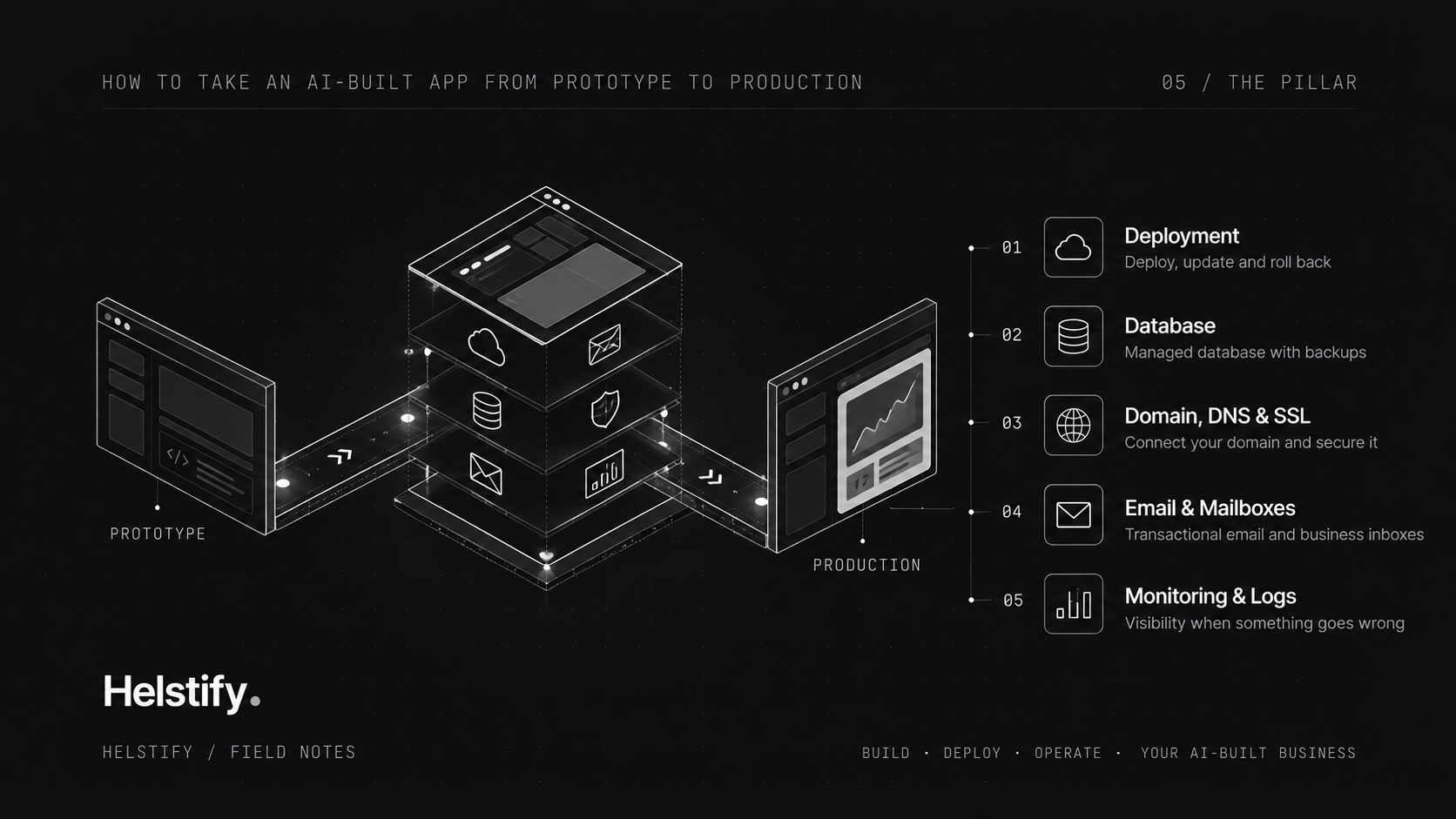
Pillar 5: How to Take an AI-Built App from Prototype to Production
Blog Fields
Title
How to Take an AI-Built App from Prototype to Production
Slug
ai-built-app-prototype-to-production
Description
Your AI-built app works. Learn what it needs to become production-ready, including deployment, hosting, domains, DNS, SSL, email, monitoring, rollback and recovery.
Tags
AI App Deployment, Production Ready AI App, AI-Generated App, Vibe Coding, SaaS Deployment, App Hosting, DNS, SSL, Rollback, Monitoring, Database Backup, Helstify
Published At
2026-10-18
Is Published
Yes
SEO Title
How to Make an AI-Built App Production-Ready | Helstify
SEO Description
Learn how to take an AI-built app from prototype to production with deployment, hosting, DNS, SSL, email, monitoring, rollback and recovery.
SEO Keywords
AI app production ready, deploy AI-generated app, deploy vibe coded app, host Claude built app, deploy Codex app, AI app hosting, AI app deployment, production checklist AI app, domain DNS AI app, SSL AI application, SaaS email setup, deployment rollback, AI app monitoring, production errors, database backup AI app
Search Engine Visibility
Index, Follow
Canonical URL
https://helstify.com/blog/ai-built-app-prototype-to-production
SEO Image URL
Add after the Pillar 5 image is finalized.
Content
Your AI-built app works.
You can open it. The screens load. The main workflow works. Maybe users can already sign up, enter data or complete the core action.
That is an important milestone.
But it does not necessarily mean the application is ready for production.
A prototype proves that the product can work.
Production means the product has the environment, controls and operating processes needed for real use.
Quick answer: To make an AI-built app production-ready, you need more than working code. You need a production environment, a repeatable deployment process, a domain and DNS, SSL, protected credentials, database protection, email, monitoring, logs, rollback and a recovery plan.
Helstify does not remove the need to make these decisions. It provides an environment in which you and the AI you connect can work on these parts of the business without treating every layer as a separate project.
What does production-ready mean?
A production-ready application is an application you are prepared to put in front of real users.
It should not only work when everything goes correctly.
It should also be prepared for:
- real traffic
- real user accounts
- real data
- real payments
- failed requests
- bad deployments
- configuration mistakes
- application errors
- database problems
- infrastructure problems
Production readiness is therefore not a single deployment button.
It is the combination of the application, infrastructure and operating processes required to keep the product usable and recover when something goes wrong.
Prototype vs production
A prototype is designed to answer:
Can this product work?
Production has to answer a larger set of questions:
Where does the application run?
How does it get updated?
What happens when an update breaks?
Where is the data stored?
Can the data be recovered?
How do users access the application securely?
Does the domain resolve correctly?
Is SSL working?
Can the product send email?
Can you see errors when something fails?
Can you diagnose a production problem?
An application can look complete while several of these layers are still missing.
For a broader view of the infrastructure behind an AI-built SaaS, see How to Build a SaaS with AI: The Infrastructure Behind the App.
What does an AI-built app need before going live?
The exact stack depends on the application, but a typical production application can require these layers:
| Production layer | What it does |
|---|---|
| Application | Runs the product users interact with |
| Hosting | Provides the environment where the application runs |
| Database | Stores application and customer data |
| User accounts | Handles authentication, sessions and access |
| Deployment | Moves application changes into production |
| Version control | Tracks code and changes |
| Domain | Gives the product its public address |
| DNS | Routes the domain to the correct infrastructure |
| SSL | Encrypts traffic between the user and application |
| Handles transactional and operational communication | |
| Monitoring | Shows infrastructure and application health |
| Logs | Help diagnose errors and unexpected behaviour |
| Rollback | Restores an earlier working application version |
| Backup | Protects important application data |
| Recovery | Defines how service or data is restored after a failure |
Not every application needs the same stack.
A simple website can need very little. A SaaS application with customers, payments and stored data needs considerably more.
The important point is that the stack should match the risk and complexity of the product.
How do I deploy an AI-generated app?
An AI-generated application is deployed much like any other application.
The difference is often in how quickly the code was created and how much of the technical environment has already been prepared.
A production deployment can require:
- a production environment
- the application code
- the correct runtime
- required dependencies
- environment variables
- database connectivity
- deployment configuration
- a live domain
- SSL
- verification after deployment
The application should also have a repeatable way to deploy future changes.
The goal is not for Helstify to decide all of this for you.
The goal is to give you and your connected AI an environment where the required infrastructure, code and operating tools can be worked on together.
See How Helstify works for the broader idea-to-live workflow.
How do I deploy a vibe-coded application?
Vibe coding makes it possible to move from an idea to working software very quickly.
That speed is useful.
But the way an application was created does not remove production requirements.
Before taking a vibe-coded application live, review whether:
- production configuration is separated from development configuration
- credentials and secrets are protected
- authentication works correctly
- the database is connected safely
- important data has an appropriate backup strategy
- the application can be redeployed consistently
- a previous working version can be restored
- logs are available
- application health can be checked
- the live domain and SSL are configured correctly
Vibe coding can accelerate product development.
Production still needs operating discipline.
How do I host an app built with Claude or Codex?
Claude, Codex and other coding agents can help create, modify, debug and improve an application.
The application still needs an environment in which to run.
That environment can include:
- compute resources
- storage
- runtime
- database access
- environment variables
- networking
- domain configuration
- SSL
- deployment tooling
- logs
- monitoring
The AI that works on the application and the infrastructure where the application runs are different layers.
Helstify is designed to provide the operating environment and give a supported, connected AI access within the permissions you choose.
It does not mean every production task happens automatically.
You still decide what should happen, what access the AI receives and when changes should be made.
Read Connect Your AI to Your Business and Let It Work for more on the connection and permission model.
What should a production hosting environment provide?
Production hosting is not only disk space.
Depending on the application, the environment may need to support:
- application processes
- web services
- databases
- storage
- networking
- domains
- certificates
- email services
- development or administration tools
- monitoring tools
Helstify provides hosting environments and a catalogue of software and services that can run on the machine.
Which services you actually use should depend on what your application needs.
What should a production deployment process include?
A basic production deployment process should make it possible to:
- prepare the new version
- deploy the application
- verify that it started correctly
- confirm critical functionality
- inspect errors
- monitor the release
- return to an earlier working version if necessary
This becomes increasingly important once real customers use the product.
A failed release is no longer only a development inconvenience.
It can prevent users from logging in, making payments, accessing data or using the service.
The environment should make deployment and recovery possible. The user or connected AI still needs to decide when and how those actions are performed.
What is a deployment rollback?
A rollback restores an earlier working version of an application after a deployment causes a problem.
Imagine that a change is made to the authentication flow.
The updated application is deployed.
A few minutes later, real users start experiencing login failures.
One option is to keep modifying the broken production version while customers continue experiencing the problem.
Another option is to return to the previous working version first, investigate the issue and then deploy a corrected release.
That is the purpose of rollback.
The important capability is not that rollback happens by itself.
It is that the environment gives you or an authorised AI a practical path back to a known working version.
The Helstify platform is the relevant internal reference for the build, deployment and versioned environment.
What happens when an AI deployment breaks?
A useful response process is:
- Detect the problem.
- Understand which part of the application is affected.
- Check whether the problem followed a recent deployment.
- Inspect the relevant logs and environment.
- Roll back if that is the appropriate response.
- Diagnose the root cause.
- Fix and test the issue.
- Redeploy when ready.
- Verify the live application again.
The goal is not to promise that production failures will never happen.
They will.
The goal is to have an environment in which the problem can be inspected and the appropriate recovery action can be taken.
How do I connect a domain to an AI-built application?
A customer-facing production application normally needs a stable domain.
For example:
yourbusiness.com
or:
app.yourbusiness.com
Connecting the domain involves configuring DNS so requests for that domain reach the infrastructure running the application.
Common DNS record types include:
- A
- AAAA
- CNAME
- MX
- TXT
Which records are required depends on the application and the services connected to it.
Helstify provides the environment and domain/DNS tooling used as part of the broader build-to-live workflow. The exact records still depend on what you are running.
See How Helstify works.
Why does DNS matter?
DNS connects the name people type into a browser with the infrastructure that serves the application.
When DNS is wrong, the application can be healthy while users still cannot reach it.
DNS can also affect:
- application subdomains
- verification records
- third-party services
- SSL issuance
That is why domain and DNS configuration belongs inside the production checklist rather than being treated only as a branding task.
How do I set up SSL for an AI app?
SSL encrypts communication between the user's browser and your application.
When SSL is configured correctly, users access the product over HTTPS.
A customer-facing production application should normally use HTTPS.
SSL matters for:
- protecting information in transit
- browser trust
- login security
- payment flows
- API communication
The certificate also needs to remain valid.
Helstify's environment can support the domain, DNS and certificate layer. The production owner still needs to verify that the correct domain is connected and the live application is behaving as expected.
How do I manage environment variables and credentials?
Applications often need credentials to connect to other systems.
Examples include:
- database credentials
- payment provider keys
- email credentials
- API keys
- authentication secrets
- third-party integration tokens
These values should normally be kept outside application source code.
Environment variables allow the application to use different configuration in development and production without hardcoding sensitive credentials into the codebase.
Production credentials should be controlled carefully because access to them can mean access to application data or connected services.
Helstify provides the environment in which these application and infrastructure settings can be managed. Access should still be granted deliberately.
How do I set up email for SaaS?
Most SaaS applications need email earlier than founders expect.
Common examples include:
- email verification
- password reset
- login notifications
- welcome emails
- invoices
- payment notifications
- product alerts
- customer support
- operational communication
There are two related requirements.
The product may need to send application email.
The business may also need mailboxes, such as:
support@yourbusiness.com
hello@yourbusiness.com
billing@yourbusiness.com
Helstify has a mail hosting environment covering domain mailboxes, webmail and application email capabilities.
Whether you need those services, how many mailboxes you create and how the application uses email remain business and product decisions.
What email records should be configured?
Production email can depend on DNS records that help receiving mail systems verify legitimate messages.
These can include:
- SPF
- DKIM
- DMARC
- MX
Incorrect mail configuration can affect delivery.
A production checklist should therefore verify not only that the application can send an email, but also that the domain and mail configuration are appropriate for the intended use.
The Helstify mail environment includes the relevant mail and deliverability tooling; the configuration should still be checked for the domain you are using.
How should an AI app be monitored?
Once an application is live, you need visibility into what it is doing.
At minimum, you should be able to investigate questions such as:
- Is the application running?
- Is resource usage normal?
- Did the latest deployment succeed?
- Are users encountering errors?
- Is the database reachable?
- Are requests failing?
- Is the server running out of resources?
- Has something changed unexpectedly?
Useful operational signals can include:
- CPU
- memory
- storage
- network activity
- deployment state
- application logs
- error logs
- database health
- service availability
Helstify provides the environment in which monitoring tools can run. Its self-hosted software catalogue includes tools for dashboards and uptime monitoring.
Explore self-hosted software and monitoring tools
The presence of monitoring tools does not by itself guarantee that every application is fully monitored. You still need to decide what matters and configure the relevant checks.
How do I diagnose production errors?
Production debugging starts with evidence.
Instead of immediately asking AI to rewrite code, first determine what actually failed.
Useful evidence can include:
- error logs
- application logs
- server health
- database status
- recent deployments
- recent code changes
- configuration changes
- failed API requests
- DNS status
- external service failures
Then narrow the issue.
For example:
Customers cannot sign up.
That does not automatically mean the signup code is wrong.
The actual cause could be:
- an application error
- a database problem
- an authentication configuration issue
- a missing environment variable
- an email verification failure
- an external API failure
Production debugging is the process of moving from symptom to cause.
Where does connected AI become useful in production?
AI becomes more useful when it has access to the environment around the code.
Instead of asking:
Why might signup be failing?
you can give a connected AI a task such as:
Inspect the environment and help determine why signup is failing.
Depending on the permissions you grant, the AI may be able to inspect relevant code, files, logs or infrastructure and help carry out permitted work.
That does not guarantee that the AI will always identify or fix the problem correctly.
It changes the working environment from disconnected advice to permissioned access to the systems involved.
That is the principle behind connecting your AI to Helstify.
How do I back up an AI application database?
If the application stores important data, it needs a recovery strategy.
Data can be lost or damaged because of:
- accidental deletion
- software defects
- failed migrations
- incorrect automation
- infrastructure failure
- compromised credentials
- human error
Helstify's current database hosting pages list daily backups on the available database plan specifications.
That should not be treated as a complete recovery strategy for every business.
For important or regulated data, decide whether you also need independent copies, off-site backups or additional retention based on your own recovery requirements.
A backup plan should answer:
- What is being backed up?
- How often?
- How long is it retained?
- Where are independent copies kept, if required?
- How is restoration performed?
- When was recovery last verified?
A backup is useful only when the required data can actually be restored.
What is the difference between rollback and backup?
They solve different problems.
Rollback usually restores an earlier version of the application.
Backup restores data.
If a new code release breaks the interface, you may need a rollback.
If a faulty operation deletes customer records, rolling back the code may not restore those records.
You may need a database backup or another recovery mechanism.
A production application can need both.
What should I check before launching?
Use this as a practical production checklist.
| Area | Check |
|---|---|
| Application | Core workflows work in the production environment |
| Hosting | The selected production environment is appropriate for the app |
| Database | Production data storage is connected and protected |
| Authentication | Signup, login, sessions and password flows work |
| Payments | Test and live payment configuration are correct, if used |
| Environment | Required production variables and secrets are configured |
| Version control | Production code and changes are tracked |
| Deployment | A repeatable deployment process exists |
| Rollback | There is a path back to an earlier working version |
| Domain | Production domain resolves correctly |
| DNS | Required records are configured |
| SSL | HTTPS works correctly |
| Required application email works | |
| Mailboxes | Required business inboxes are configured |
| Deliverability | SPF, DKIM and DMARC are checked where applicable |
| Monitoring | Relevant infrastructure and application health can be inspected |
| Logs | Errors can be investigated |
| Backup | Important data has an appropriate backup strategy |
| Recovery | You know what to do when production fails |
A small application may not need enterprise infrastructure.
But every production application needs enough operational discipline for the risk it carries.
Do I need DevOps to launch an AI-built app?
You need many of the outcomes traditionally associated with DevOps.
You need a way to:
- provision the environment
- configure production
- deploy applications
- manage domains
- protect credentials
- inspect health
- diagnose failures
- recover from problems
That does not mean every founder should personally become a DevOps engineer.
Helstify's role is to provide an operating environment where these systems and tools can live together and where a connected AI can work within the permissions you grant.
You still own the decisions.
AI and the environment can reduce the amount of infrastructure work you need to perform manually, but they do not remove the need for judgment, verification or responsibility.
Can AI operate the production environment?
A connected AI can work with a production environment when it has the required access, tools and permissions.
The important word is permissioned.
You should decide what the AI can:
- inspect
- change
- execute
- deploy
- access
Helstify provides permission controls for connected AI so the operating model can be adjusted according to the task.
The objective is not unlimited autonomous control.
It is to give AI enough access to be useful while keeping authority with the user.
For the broader model, see What Is an AI-Native Business Operating Environment?.
Where Helstify fits
Helstify is the environment between the AI you choose and the systems your business needs to run.
Depending on the application and the services you choose, that environment can bring together:
- application and website
- database
- development and code tooling
- deployments
- domain and DNS
- certificates
- email and mailboxes
- monitoring tools
- other self-hosted services
Helstify provides the environment and access.
You decide what the business needs.
Your connected AI can then inspect or work on permitted parts of that environment according to the access you give it.
This distinction matters.
Helstify should not be understood as a guarantee that AI will automatically build, deploy, monitor, fix or operate every part of a business without user involvement.
It is the operating environment that makes those workflows possible.
What if my app already exists?
You do not need to start with an idea.
If you already have an application or an operating business, the relevant journey can begin with the existing codebase and domain.
The practical path becomes:
Existing app → bring the code and domain → connect the environment → configure what it needs → deploy → operate
This is useful when:
- an AI already built your prototype
- a developer created the first version
- you have an existing codebase
- the application currently runs somewhere else
- you want a more connected operating environment
The objective is not to rebuild something that already works.
It is to give the existing application the environment and operating controls it needs for production.
What changes after launch?
Launch is not the finish line.
Once real users arrive, new work begins.
You may need to:
- diagnose customer issues
- release improvements
- modify database structures
- add integrations
- adjust infrastructure
- create mailboxes
- monitor resource usage
- investigate failed deployments
- return to an earlier release
- investigate production errors
That is why production should be thought of as an ongoing operating environment rather than a final deployment event.
Frequently asked questions
Can I deploy an app generated by AI?
Yes. AI-generated code can be deployed like other software, provided the application has the runtime, infrastructure, configuration and services it requires.
Can I deploy a vibe-coded app to production?
Yes. Before launch, review authentication, secrets, database design, deployment, rollback, monitoring and backup requirements. Fast development does not eliminate production requirements.
Can Claude deploy an application?
Claude can assist with deployment work when it has access to the necessary environment, tools and permissions. Whether a particular deployment should be executed remains a user decision.
Can Codex deploy an application?
Codex can assist with deployment work when connected to the appropriate environment and given the required permissions. The application still needs hosting, configuration and operational controls.
Does an AI app need a domain?
Not necessarily during development. A customer-facing production application will usually benefit from a stable domain controlled by the business.
Does my app need SSL?
Customer-facing production applications should normally use HTTPS with a valid certificate.
Do I need rollback capability?
If a bad release could interrupt users or business operations, having a practical way to return to an earlier working version is valuable.
Do I need database backups?
If losing application data would matter to your users or business, you need an appropriate backup and recovery strategy.
Does Helstify automatically monitor my application?
Helstify provides an environment in which monitoring and operational tools can run. The checks and monitoring you require still depend on the application and need to be configured appropriately.
Does Helstify automatically fix production errors?
No such outcome should be assumed. A connected AI can inspect and work within the access you grant it, but diagnosis and fixes still need to be reviewed according to the importance and risk of the application.
Is launching the same as being production-ready?
No. An application can be publicly accessible without having adequate monitoring, backup, rollback, security or recovery processes.
The production-ready principle
AI has dramatically reduced the effort required to create software.
The next challenge is reducing the friction between that software and the environment required to operate it.
That means moving beyond:
AI wrote the app.
Toward:
AI can work with the environment the business depends on.
Helstify provides that environment.
You remain in control of what gets connected, what gets changed and what gets deployed.
The product is not finished when the code works.
It is ready when the business can rely on the way it is operated.
Prototype proves the product. Production prepares it for the business.
Build with AI. Run with Helstify.